

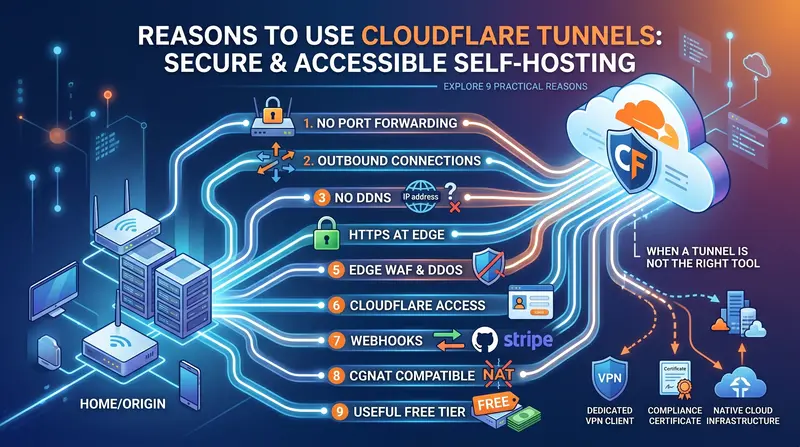
Let’s say you are running a service on your home network—maybe a smart home dashboard (like Home Assistant), a private website you’re coding, or a home file server. You want to be able to access it when you are away from home, or you want a friend to look at it.
To let the outside internet in, the old-school method is called port forwarding. This is the digital equivalent of unlocking a specific window in your house, publishing your home address to the world, and hoping no burglars notice the open window.
Cloudflare Tunnel changes the game. Instead of unlocking any windows, your home computer reaches out to Cloudflare’s secure servers in the cloud and establishes a private, encrypted hallway between them. When someone wants to visit your site, they talk to Cloudflare, and Cloudflare passes the message back to your computer through this private hallway. No windows are unlocked, and your home address remains hidden.
Do I need this?
If you are running a self-hosted app, home server, or development site and need it safely accessible from the internet, a Cloudflare Tunnel is the gold standard. If you’d rather not deal with the configuration, DNS routing, or firewall settings yourself, Shrinkray Interactive can handle the entire setup for you.
To learn how tunnels work and why they are so secure, see below.
Ready to secure your network? Reach out to Greg to get your own custom tunnel configured today!
Table of contents
Open Table of contents
- You stop opening doors on your router
- If they can’t find your door, they can’t knock on it
- Changing home addresses stops being a headache
- Free security padlocks without the headaches
- Your small project gets enterprise-grade shields
- Add a bouncer to your site in two clicks
- Easy integrations for developers (Webhooks)
- It works even when your internet provider blocks you
- The free plan is actually free and powerful
- When is a tunnel not the right tool?
- Time to lock the doors
- Let me build your own Custom Tunnel
You stop opening doors on your router
Ports are like doors on your internet router. By default, your router blocks all incoming traffic to keep you safe. Port forwarding means you carved a small pet door into your firewall and pointed it directly at your device (like a home storage drive or computer).
The problem is that automated bots crawl the internet 24/7, shaking every door handle they can find. If you leave a port open, those bots will find it and try to exploit outdated software or guess your passwords.
With a tunnel, you don’t open any doors. The tunnel software (a tiny program running on your computer) makes an outbound connection. It’s like your computer calling out to Cloudflare and keeping the phone line open. Traffic comes in through that phone line, meaning your router’s doors remain locked tight.
For homelabs, side projects, and small business gear sitting on a consumer connection, that is a meaningful security upgrade without buying enterprise hardware.
If they can’t find your door, they can’t knock on it
Attackers can’t hack what they can’t see. When you use port forwarding, your public IP address is exposed, meaning anyone can scan your connection. If there is a bug (a security vulnerability) in your home software, they can exploit it.
With a tunnel, your home setup is invisible to the public internet. Visitors only see Cloudflare’s massive network. Think of Cloudflare as a highly trained security guard standing at the entrance of a gated community. If a bot or hacker tries to spam your site or send malicious traffic, the guard blocks them at the gate before they ever get near your actual home network.
Changing home addresses stops being a headache
Every home internet connection has an IP address—think of it as your house’s mailing address. However, home internet providers constantly change this address every few days or weeks (this is called a “dynamic IP”). If you are hosting a website, this means your site’s address is constantly changing, making it impossible for people to reliably connect to it.
Normally, you have to buy a costly “static IP” or set up complicated updater tools (Dynamic DNS) that break when you least expect it.
Because a Cloudflare Tunnel keeps a constant connection open from your computer out to Cloudflare, it doesn’t matter if your home’s mailing address changes. Cloudflare always knows where your computer is because the computer is the one keeping the connection alive. Your website name (like myproject.com) stays online without you needing to lift a finger.
Free security padlocks without the headaches
When you visit a website, you expect to see the secure padlock icon in your browser address bar. This is powered by HTTPS and an SSL/TLS certificate—a digital security badge proving your site is secure.
Setting up these certificates on your own home computer is notoriously frustrating. You have to install renewal tools, make sure they run every few months, and configure complex server software. If something breaks, visitors get a scary “This site is not secure” warning.
When you use a tunnel, Cloudflare automatically provides and manages the SSL certificate for you. Visitors get a secure, encrypted connection to Cloudflare, and Cloudflare encrypts the rest of the journey to your home computer. You get the padlock icon instantly without configuring any certificate tools at home.
Your small project gets enterprise-grade shields
Your home computer or a cheap virtual server was never designed to handle thousands of visits at once. If your site gets popular, or if a malicious group tries to overwhelm it with fake traffic (a DDoS attack), your home internet will crash.
By routing your traffic through Cloudflare’s tunnel, you get to borrow their massive global network. If a flood of traffic hits your site, Cloudflare absorbs it and only sends the legitimate visits down the tunnel to your home computer. It’s like having a giant buffer that prevents your home internet from being knocked offline.
Add a bouncer to your site in two clicks
Just because your project is online doesn’t mean you want the public to see it. Maybe it’s a private family photo album or a dashboard for your home smart devices.
Normally, keeping these secure means setting up a complex VPN (Virtual Private Network) or managing logins inside your app.
With Cloudflare, you can turn on a feature called Cloudflare Access. This acts like a bouncer at the door. Before anyone is even allowed to see your website, they have to log in using an approved method—like their Google account, GitHub, or a one-time email code. If they aren’t on the list, Cloudflare turns them away before they ever reach your computer.
Easy integrations for developers (Webhooks)
If you are building apps, you often need external services to send messages to your local computer. For example, when someone pays you on Stripe or pushes code to GitHub, those services need to send a notification (a “webhook”) to your project.
Getting these notifications to reach a computer in your living room is incredibly hard because home networks block outside requests by default.
A tunnel gives you a simple, public link that connects directly to the app running on your computer. You can test payment systems, chat bots, and other tools on your own computer without having to pay for online servers or mess with insecure router settings.
It works even when your internet provider blocks you
Many modern internet providers use a technology called CGNAT (Carrier-Grade NAT). Essentially, they share a single public IP address among hundreds of different homes in your neighborhood. Because of this, traditional port forwarding is physically impossible—you don’t have your own “front door” to unlock.
Similarly, if you are at an office, a university, or a coffee shop, their firewalls will block any incoming connections.
But because a Cloudflare Tunnel is an outbound connection (your computer initiating the call to Cloudflare), CGNAT and strict network firewalls don’t block it. If your computer can browse the web, it can host a tunnel.
The free plan is actually free and powerful
Usually, security tools like this are expensive or have severely limited free plans. Fortunately, Cloudflare’s tunnel feature is completely free for personal use, side projects, and small teams. You can run multiple tunnels, connect different projects, and secure them with login screens without paying a cent.
When is a tunnel not the right tool?
Tunnels are amazing for making a specific app or website reachable. But they aren’t a cure-all:
- If you need access to your entire home network: If you want to connect to your home printer, your smart TV, and all your computers at once while away, a VPN (like WireGuard or Tailscale) is a better choice.
- If you have strict data privacy needs: Since all traffic goes through Cloudflare’s servers to be inspected for security, companies with strict government compliance rules may not want their data passing through a third party.
Time to lock the doors
Setting up a tunnel usually takes under ten minutes. You install a small helper program, log in to your Cloudflare account, name your website, and point it at the app running on your computer.
Once you do, you can log into your home router and lock every single inbound port. You stop thinking about your home’s public IP address as your front door. Cloudflare becomes your front door, your bouncer, and your security system—giving you peace of mind that your home network is completely secure.
Let me build your own Custom Tunnel

If you want to secure your self-hosted websites, home servers, or private projects but don't want to wrestle with command line tools, DNS setups, or firewall settings, Shrinkray Interactive is here to help. We can design and implement secure outbound tunnel architectures, configure authentication bouncers, and audit your remote access setups to make sure your home or business network stays completely protected.
Ready to lock down your network? Reach out to Greg to get your own custom tunnel configured today!